Hi Clint
First, I'll just say Thermwood is great, eCabs is great, The whole team of you guys do an excellent job of solving and sorting out any problems I have had.

I am very happy we went with the Thermwood machine and team, Its amazing!
Its about 8 years old and still works like new. (Cabinet Maker surreptitiously touches wood).
How ever.
I tend to agree with Ingbert
For me, this is the most featured but one of the buggiest releases of eCabs.
At the end of 2025 I did a total fresh install of eCabs to try and get a smoother workflow, just keeping my KD drilling patterns and redoing all my materials, not bothering with old libraries and starting starting with new seed cabinets.
If I had to reopen old jobs, I would substitute new materials and hardware and try not to import anything.
Sadly, Its been a bit of a waste of time because its just as buggy as before.
So this year since reinstalling, these are some messages I can recall.
Its things like, Saving a door or drawer design and the next time you open it its message is material not found, or the body has gone, Or hole patterns just disappearing, generally off drawers in assemblies, and you don't notice until its cutting on the machine, or edge banding body not found, (that one doesn’t seem to affect nesting or cutting) or like today, yesterday I spent a couple of hours on placing holes and cutouts on a R/hood cabinet, I just need to put 3 stretchers and one more cutout, today I open it and the right hand end has gone haywire, Thursday / Friday it was an end panel not flip oping properly.
There is always something to make life interesting.

You know me by now

I would send in or post details if I knew what was triggering it.
Sometimes I wonder if its just my computer configuration, My work flow methods, or if I’m over specifying my cabinets, because apart from Ingbert no one else seems to have any issues.
Its not that the software is no good, Its great, I know after playing around some more with that cabinet I will get it the way I want it. I don't know why it just randomly bugs out.
We always get there in the end, Its just the journey is a bit longer than we anticipated.
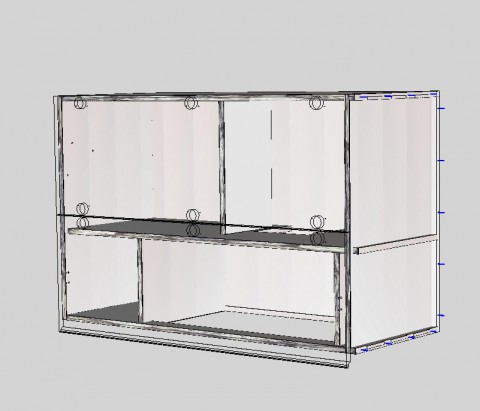
- Range hood cupboard . Salice lift up doors. (drawers for doors)
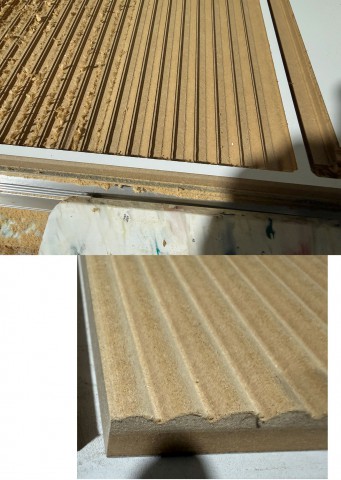
- How its supposed to look and how it cut
I know if we identify the causes you will fix it, Its just that its not easy to find the nasties.
Anyway because I am here, I have attached the broken unit from today, no idea what or why, all I did was save it yesterday and reopen it today.
I didn't bother with saving the panel job nesting / tooling, (It was probably just specific to that piece, so not worth the time) . I just redid it without the front return and nested it by itself and it worked fine, except now I have to put the funny little return on by hand.
Anyway, it is what it is, and I always appreciate your help.
I wanted to put my thoughts and experiences of the software forward for your consideration.
I am intrigued and looking forward to the new release and cant wait to start testing that beta.
Perhaps all the little quirks will just disappear into dusty code with the next release
Thanking you
Mark