Hi Guys
Example problem of adding a door with a bottom profile without hinge holes
In the attached cabinet the profile cut is stuck at the previw door size.
The preview standard slab default door size is 406.4mm,
Changing the preview size is affecting the way the door gets added
By deleting the door and reselecting it from the library fixes it for a while.
I will attache some more examples in the next reply because I have exceeded my attachment limit
Thanks
Mark
Door editor profile stuck
Moderators: Jason Susnjara, Larry Epplin, Clint Buechlein, Scott G Vaal, Jason Susnjara, Larry Epplin, Clint Buechlein, Scott G Vaal
-
Mark McCallum
- Guru Member
- Posts: 551
- Joined: Thu, Jun 16 2005, 7:53PM
- Location: Sydney Aust
-
Mark McCallum
- Guru Member
- Posts: 551
- Joined: Thu, Jun 16 2005, 7:53PM
- Location: Sydney Aust
Re: Door editor profile stuck
Thanks
Mark
Mark
- Attachments
-
- WO Top box ehibit B.jpg (9.64 KiB) Viewed 115 times
-
Mark McCallum
- Guru Member
- Posts: 551
- Joined: Thu, Jun 16 2005, 7:53PM
- Location: Sydney Aust
Re: Door editor profile stuck
Here is an example of a tiny random piece and for some reason something has gone wrong with the door and I cant change the top reveal to 0mm.
I'm not sure if anyone else can?
Its been saved and reloaded as a library cabinet just lost something, I don't know why
Deleting and readding the door fixes it
I'm not sure if anyone else can?
Its been saved and reloaded as a library cabinet just lost something, I don't know why
Deleting and readding the door fixes it
-
Mark McCallum
- Guru Member
- Posts: 551
- Joined: Thu, Jun 16 2005, 7:53PM
- Location: Sydney Aust
Re: Door editor profile stuck
I don’t know what causes this but its pretty standard on a lot of units.
The door or drawer fronts need replacing with the same door or drawer fronts because something happens to them when saved .
Anybody else have these things happen?
So on this drawer bank I delete the two top cutouts in the part editor.
Leave the stretcher rails and cutouts
Come back to the main screen.
resize to 400 wide, accept loose part editor cuts on the deck
Go to drawer door editor
Ctl A
Delete
Go to settings, set Top drawer / door settings to 20mm
Select opening
Add drawer. change to 4
accept Ok to implement and add drawers
These error messages pop up x 4
To Fix
Go to drawer door selection.
Load default (Door or drawer front)
Error MSG. error in creating cutpath segments. hit OK
Hit load again, because that thing where the details don’t load properly and you just need to refresh to get it to show the details.
Same Error MSG. error in creating cutpath segments. hit OK again,
Directories appear.
Go to directory. Reselect the same door or drawer again.
Drawers can now be added / changed as per normal
Some time between saving this now good drawer bank and reloading and changing the door / drawers, it probably will need reseting the drawer door fronts,
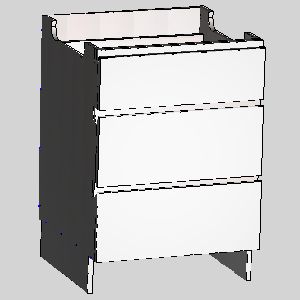
The door or drawer fronts need replacing with the same door or drawer fronts because something happens to them when saved .
Anybody else have these things happen?
So on this drawer bank I delete the two top cutouts in the part editor.
Leave the stretcher rails and cutouts
Come back to the main screen.
resize to 400 wide, accept loose part editor cuts on the deck
Go to drawer door editor
Ctl A
Delete
Go to settings, set Top drawer / door settings to 20mm
Select opening
Add drawer. change to 4
accept Ok to implement and add drawers
These error messages pop up x 4
To Fix
Go to drawer door selection.
Load default (Door or drawer front)
Error MSG. error in creating cutpath segments. hit OK
Hit load again, because that thing where the details don’t load properly and you just need to refresh to get it to show the details.
Same Error MSG. error in creating cutpath segments. hit OK again,
Directories appear.
Go to directory. Reselect the same door or drawer again.
Drawers can now be added / changed as per normal
Some time between saving this now good drawer bank and reloading and changing the door / drawers, it probably will need reseting the drawer door fronts,
-
Mark McCallum
- Guru Member
- Posts: 551
- Joined: Thu, Jun 16 2005, 7:53PM
- Location: Sydney Aust
Re: Door editor profile stuck
Hi
Sorry for all the posting.
Just trying to get to the bottom of the irregularities I experience.
Adding to the above drawer observation.
In the attached picture the drawer front is the same drawer front . As you can see the 4 drawer set and the 3 drawer set have rendered slightly differently, The bottom drawers on the 600 drawers don't have the slip or feather showing where as the other 5 do have it showing.
Do you think this Is this just a rendering glitch (which I don't really care about) or is it contributing to the software instability?
Thanks
Mark
Sorry for all the posting.
Just trying to get to the bottom of the irregularities I experience.
Adding to the above drawer observation.
In the attached picture the drawer front is the same drawer front . As you can see the 4 drawer set and the 3 drawer set have rendered slightly differently, The bottom drawers on the 600 drawers don't have the slip or feather showing where as the other 5 do have it showing.
Do you think this Is this just a rendering glitch (which I don't really care about) or is it contributing to the software instability?
Thanks
Mark